
Initializing the SDK
Embed the following code in the head TAB of the business-critical entry page
<script type="text/javascript">
	(function(){
		window._fmOpt = {
			success: function(data) {
				console.log('blackBox: ', data)
			}
		};
		var fm = document.createElement('script');
                fm.type = 'text/javascript'; fm.async = true;
		fm.src = 'Base URL' + '?t=' + (new Date().getTime()/3600000).toFixed(0);
		var s = document.getElementsByTagName('script')[0];
                s.parentNode.insertBefore(fm, s);
	})();
</script>
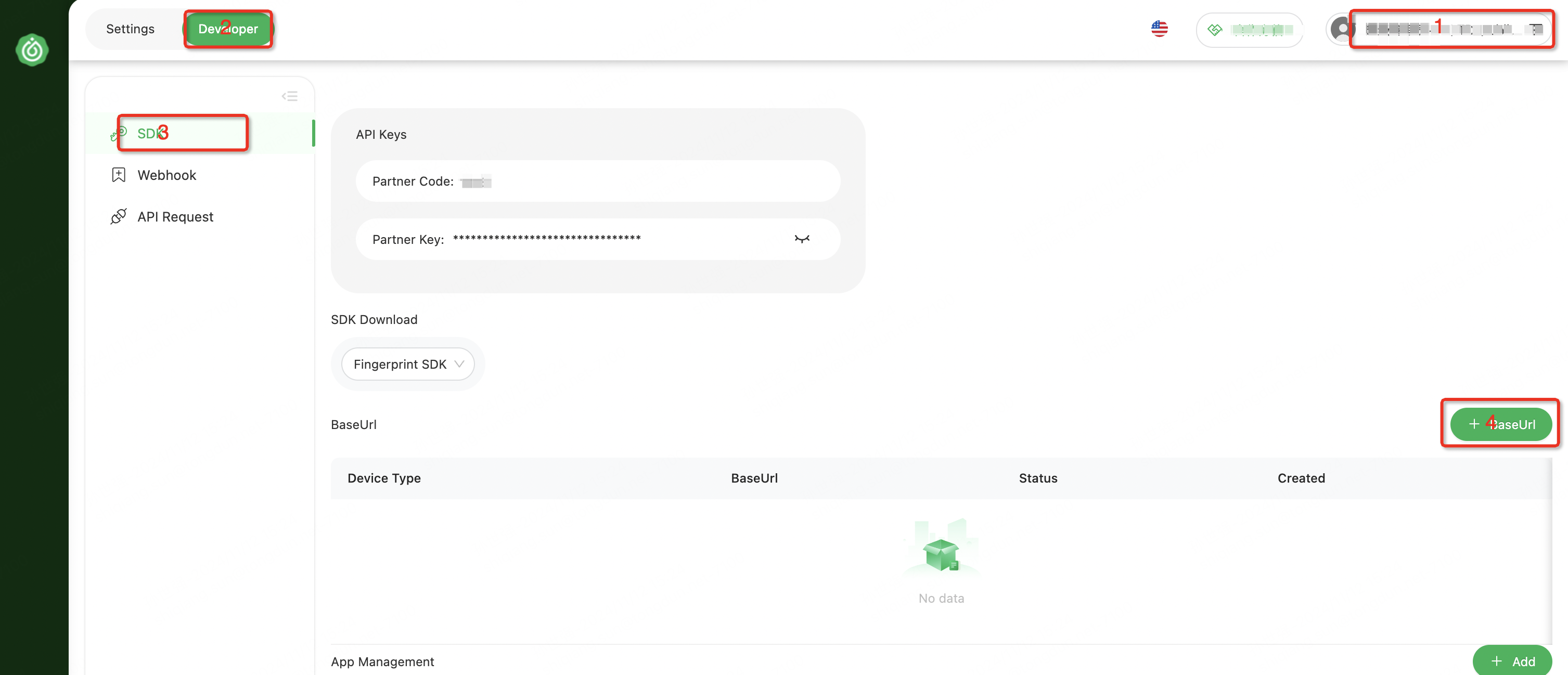
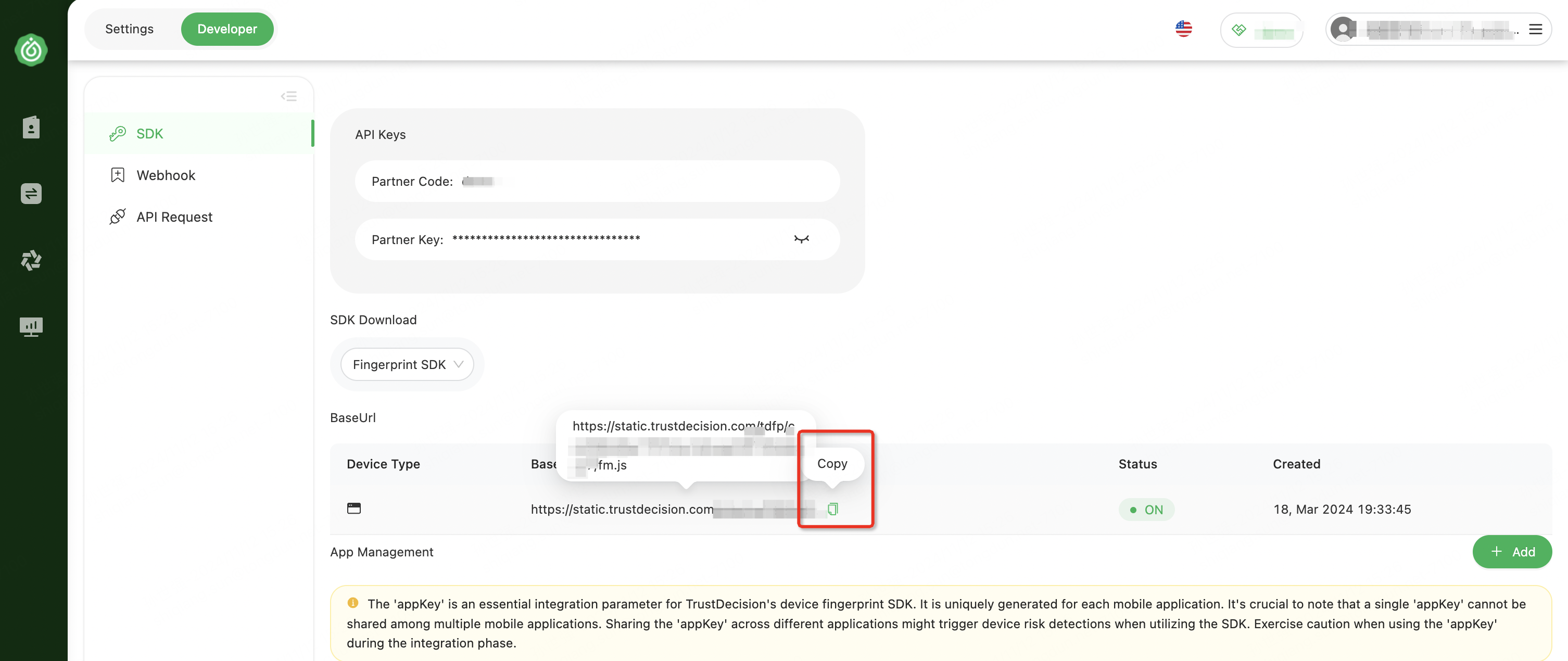
Base URL
1.Create Base URL
2.Copy Base URL
window._fmOpt Parameter Description
| parameter | type | describe | remark | sample | required | Remove Field |
|---|---|---|---|---|---|---|
| channel | String | channel | Do not change at will (only letters, numbers, underscores) | demo_web | No | |
| success | Function | Successful callback | Once the blackBox is successfully fetched, the incoming callback is called | function(data){ console.log('blackBox:',data) } | Yes | |
| timeout | Integer | Collection timeout | The unit is ms. The default value is 2000. If all processes are not completed after the specified time, a demoted blackBox is obtained | 2000 | No | |
| strictMode | Boolean | Strict mode | true: The current demoted blackBox is returned when demoted false: Returns the cached last non-demoted blackBox (default) when demoted | false | No | |
| geolocation | Boolean | Enable geolocation collection | true: Enable(After enabling it, the customer needs to obtain the permission themselves. The permission acquisition code is as follows) false: Disable (default) | false | No | latitude、longitude |
When geolocation is configured to true, the customer needs to actively obtain the geographical location permission
if (navigator.geolocation) {
  // The first execution will trigger the pop-up box for authorization
  navigator.geolocation.getCurrentPosition(function () {}, function () {});
} else {
  // The current environment does not support obtaining geographical location information
}
Synchronously obtain the method of blackBox
The synchronous method may increase the probability of generating a degraded "blackBox". Please use it with caution in combination with the business scenario.
if (window._fmOpt && window._fmOpt.getinfo) {
  // Synchronously obtain the blackBox
  var your_blackBox = window._fmOpt.getinfo()
} else {
  // JSSDK has not been loaded completely
}
Status Check
- The SDK successfully reports the data and the returned result is a 26-character string. For example: gWPHA1780038520GyQHv1YhD61.
- In abnormal situations, the length of the returned result may reach 5,000 characters. For details, you can check the differences between the normal blackBox and the degraded blackBox
CSP 配置
If your page or gateway has configured content security policy (CSP) security restrictions, which limit scripts, workers, images, and interface domains.
please configure it in the CSP:
Content-Security-Policy: script-src 'self' 'wasm-unsafe-eval' 'unsafe-inline' https://*.trustdecision.com; worker-src 'self' blob:;img-src 'self' data:; connect-src 'self' https://*.apitd.netGet SDK Version
Obtain by source code file
/**
 * TrustDeviceJs Pro v4.2.7 - Copyright (c) TrustDeviceJs, Inc, 2026 (https://www.trustdecision.com/solutions/trustdevice)
*/
Obtain by code in runtime
window._fmOpt.sdkVersion